
Create optimal class schedules with uAchieve® Schedule Builder
uAchieve Schedule Builder is a scheduling tool that guides students to the best possible class schedule by suggesting multiple options based on available sections and their preferences.


Build class schedules with confidence
uAchieve Schedule Builder is a dynamic scheduling platform that helps students plan their academic term. Students can build class schedules manually or use the powerful algorithm of Schedule Builder to automatically generate combinations based on preferences. In addition, the modern platform allows students to connect with friends to share schedules and take them on the go with calendar exporting.
Shared schedules
With Schedule Builder, students can share schedules, see what courses their friends are taking, and upload their class schedules to external digital calendars to easily share with family, friends, and employers outside the institution.
Special accommodations
Students can block out work, sports, and other time commitments, spread classes out or cluster them in the fewest number of days as possible, set the minimum/maximum number of courses they’d like to take, and mark courses as mutually exclusive (either/or, not both). They can also indicate which instructors are preferred and view which sections friends have chosen.
Advisor access
With Schedule Builder, advisors can see student schedules to help them make the best choices based on their choice of major and academic strengths. Additionally, advisors can be given permission to edit student schedules or build schedules on behalf of students, and once the schedule is created, advisors can also register the students.
Start the scheduling process with uAchieve® Planner
More powerful together
The connection between Schedule Builder and Planner simplifies scheduling classes. uAchieve Planner validates selected courses against degree audit requirements to ensure students are planning necessary courses that move them to graduation. Then the push of a button moves the planned courses into Schedule Builder to auto-generate dozens of potential schedules based on available sections.

Built with every student in mind
uAchieve Schedule Builder has an easy-to-use interface, accessible down to a phone screen, and requires little to no customization or training. Get started with Schedule Builder today.
Features you’ll love
uAchieve Schedule Builder allows students to design multiple schedules for the courses they intend to take and include an auto-generate feature that presents various options based on students’ criteria.
Anticipated demand reports
Data from student schedules can be used to assess course demand in upcoming terms so the institution can optimize the number of seats and course sections needed based on the anticipated demand. These reports include: Scheduled Course Demand, Busy Time Reporting, and Student Schedule Preferences.
Sharing capabilities
Schedule Builder allows students to share with friends or to see the schedules that friends have shared with them, so students can coordinate schedules and build a study network. The intuitive interface lets students know which courses friends have already selected. Schedules can be printed, emailed, and exported to other calendaring systems.
Build the best schedule for the student:
Auto-generation of schedules is based on course selection and section availability, with students having the choice to auto-generate up to 100 schedule combinations
Specify preferences for auto-generated schedules, including time blocks where they do/do not want to take courses, the time between courses, weighting of preferred courses, professors, campuses, and venues (among others)
View seat availability, time conflicts, and other information governing section scheduling
Share/compare their schedules with friends and see if friends are scheduling specific course sections (given mutually approved sharing)
Students can push their schedule into the school’s registration system (PeopleSoft institutions only)
Guide students with advisor access
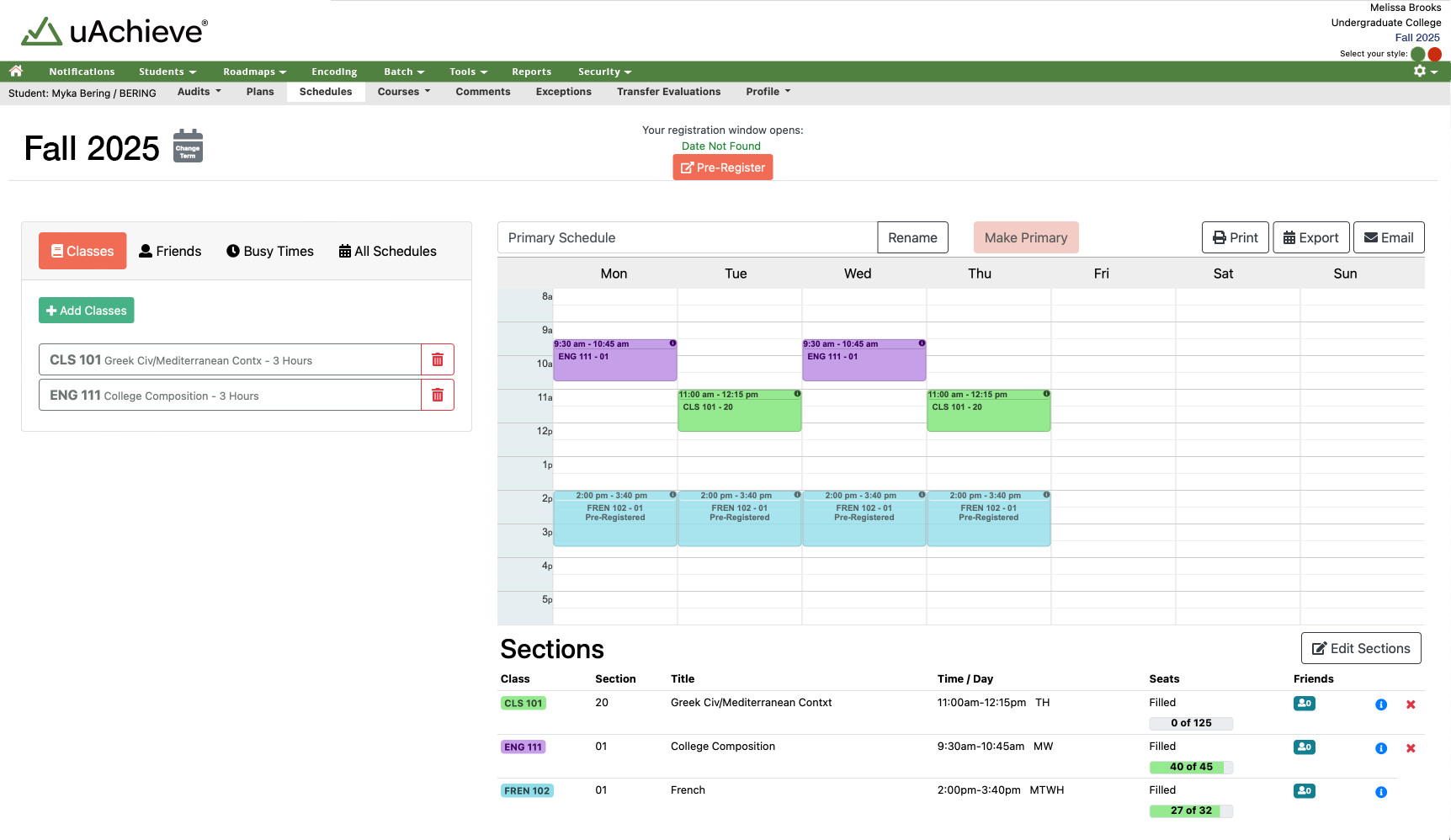
uAchieve Schedule Builder allows students to select time and instructor preferences, view classes friends are taking, as well as take into consideration other factors such as course availability and waitlists to help make the best schedule possible.
Dynamic student scheduling
Get started with the scheduler that allows students to schedule classes based on their unique preferences. Tell your team about uAchieve Schedule Builder and its features today!
Training and support
Degree Audit and Transfer Articulation encoding is challenging for even the savviest encoders. Those who have had official training from CollegeSource tend to have better success in their encoding efforts. To best accommodate our clients’ myriad training needs, CollegeSource offers multiple training opportunities that are easy to access and focused on your wants and needs. Additionally, you can visit the Support Center to access uAchieve documentation.
Available training
Select the workshop or training course titles below to view program details, including description and fee. If you have questions about our training options or need assistance choosing the right one, please contact us .
uAchieve Encoding Training
Training on fundamental degree audit encoding practices.
- uAchieve Degree Audit Encoding Workshop
- uAchieve Encoding Primer
- uAchieve Transfer Articulation Encoding Workshop
Custom training options are also available to fit various needs:
uAchieve Encoding Advanced Topics Workshop Series
A series of virtual workshops on advanced degree audit encoding topics and techniques throughout the year.
Events
List of events in Photo View
-

uAchieve Encoding Advanced Topics: Encoding Credit Restrictions and Limits
September 16 - September 17 -

uAchieve Degree Audit Encoding Workshop
October 19 - October 29 -
uAchieve Degree Audit Encoding Workshop
This workshop uses a blended training approach, combining individual learning with guided hands-on practice and exercises provided by trainers with real-world degree audit experience. To register, please visit the schedule at the top of this page and select an upcoming event.
Intended audience: This training is intended for beginning encoders or anyone wanting a robust encoding refresher and will cover topics applicable to all versions of uAchieve.
View workshop content. | This course applies toward the uAchieve Degree Audit Encoder Certification. Learn more about certifications.
Pricing and what’s included
The uAchieve Degree Audit Encoding Workshop is $1,199 (group discounts available for 3 or more!) and includes:
-
- Daily lectures led by our CollegeSource trainers who share their own experiences through real-world examples and best practice recommendations.
- Guided, hands-on exercises to practice encoding in the uAchieve environment.
- Printed training materials and exercise solutions.
uAchieve Transfer Articulation Encoding Workshop
This workshop uses a blended training approach, combining individual learning with guided hands-on practice and exercises provided by trainers with real-world transfer articulation and uAchieve experience. To register, please visit the schedule at the bottom of this page and select an upcoming event.
Intended audience: This training is designed for new transfer evaluators or experienced evaluators new to uAchieve, covering topics applicable to all versions of uAchieve transfer articulation.
View workshop content. | This course applies toward the uAchieve Transfer Articulation Encoder Certification. Learn more about certifications.
Pricing and what’s included
The uAchieve Transfer Articulation Encoding Workshop is $1,199 (group discounts available for 3 or more!) and includes:
-
- Daily lectures led by our CollegeSource trainers who share their own experiences through real-world examples and best practice recommendations.
- Guided, hands-on exercises to practice encoding in the uAchieve environment.
- Printed training materials and exercise solutions.
uAchieve Encoding Primer
Degree Audit encoding and processing is often challenging to explain to those who do not work with it daily. However, there are core concepts and basic knowledge that anyone working with encoders or beginning their own encoding journey needs to know. This 6-hour workshop (two 3-hour sessions) will provide an overview of the most relevant functionality and terminology of uAchieve Degree Audit encoding that anyone who regularly interacts with it needs to know.
To register, please visit the schedule at the top of this page and select an upcoming event.
Intended audience: This training is intended for brand-new encoders who need an introduction to encoding, transfer articulation staff who need to understand how their work may impact degree audit encoding, those who manage degree audit encoders, and technical staff who do not encode but need to be aware of how encoding and degree audit processing function.
Pricing and what’s included
The uAchieve Encoding Primer is $399 (group discounts available for 3 or more!) and includes:
-
- Lectures led by our CollegeSource trainers who share their own experiences through real-world examples and best practice recommendations.
- Printed training materials.
uAchieve Encoding Advanced Topics Workshop Series
Throughout the year, we offer a series of virtual workshops on advanced degree audit encoding topics. Each workshop lasts 3-4 hours and uses a blended training approach. Individual learning is combined with guided hands-on practice and exercises provided by trainers with real-world degree audit experience.
Intended audience: This training is intended for intermediate to advanced encoders with previous uAchieve workshop training, on-site training, or 5+ years of uAchieve encoding experience.
The following Advanced Topics Workshop offerings are available at various times of the year.
Advanced String Table Rules
3 hours | View workshop content.
Calculating Required Electives Using Reference Values
4 hours | View workshop content.
Course Grouping Sub-requirements
4 hours | View workshop content.
Encoding Credit Restrictions and Limits
6 hours (two 3-hour sessions) | View workshop content.
System Condition Codes and Conditional Requirements
4 hours | View workshop content.
Course hours apply toward the uAchieve Degree Audit Encoder Certification. Learn more about certifications.
Pricing and what’s included
Each Advanced Topics Workshop is $350 (group discounts available for 3 or more!) and includes:
-
- Lectures led by our CollegeSource trainers who share their own experiences through real-world examples and best practice recommendations.
- Guided, hands-on exercises to practice encoding in the uAchieve environment.
- Printed training materials and exercise solutions.
Individualized uAchieve Workshop
Our uAchieve workshops can be scheduled at your convenience, delivered in-person or virtually, and tailored to fit your institution’s needs. Select your uAchieve workshop of choice (uAchieve Encoding, Advanced Topic, or NCAA Encoding) and whether it will be held in person or virtually:
-
- Virtual: Up to 10 attendees (7 Business days – 4 hours/day)
- In Person: Up to 10 attendees (3 ½ business days, 8 hours for three days, and 4 hours on the last day)
For a flat fee, CollegeSource will provide the appropriate staff and materials for your uAchieve workshop of choice. Please note that for in-person workshops, the institution will need to provide the training room, WiFi access, and any necessary AV needs (i.e., a projector).
Don’t have enough people to fill a workshop?
You can host a regional workshop. Client-hosted regional workshops are in person, located on your campus, and registration is open to uAchieve encoders across the country. In addition, CollegeSource will promote the workshop to help boost attendance.
Contact us to learn more and receive pricing information.
Encoding Mentorship Program
The Encoding Mentorship Program was created to help staff at institutions understand the reasoning behind and learn to maintain inherited encoding. The program is not designed to replace training but to aid in understanding the existing encoding. Those participating in the mentorship program must have completed uAchieve Basic Encoding training. CollegeSource will assign a dedicated Functional Implementation Specialist to work with your staff member remotely throughout the length of the program (6 or 12 months) in providing the following:
-
- Monthly hour-long virtual meetings to discuss encoding, the types of issues/challenges you are currently facing, and to set priorities on what guidance may be needed for the rest of the month.
- Up to 4 hours of additional assistance/working session(s) throughout the month, as requested.
- Direct support through your dedicated Functional Implementation Specialist, eliminating the need to submit help tickets or rely solely on support documentation.
Below are some examples of the assistance CollegeSource can provide in the mentorship program:
-
- Review existing encoding strategies and collaborate to provide guidance for optimizing your encoding based on best practices.
- Help troubleshoot complex curriculum challenges and navigate unique institution’s policies.
Pricing is $6,500 per person for a 6-month mentorship, or $12,750 for 12 months.
Contact us to learn more and get connected with your mentor today.
uAchieve Degree Audit Encoding Workshop
Course content includes:
- Encode Programs and Requirements
- Course Matching and Course Lists
- The COM Table
- Duplicate Logic and the Repeat Table
- The Grade Table
- Requirements Groups and Course Reuse
- Marker Programs and Lists of Requirements
- uAchieve Audit Processing
- Requirement Types
- Sub-requirement Types
- Using ANDs and ORs
- Hungry Elective
- Reserved Condition Codes
- Course Condition Codes
- Total Hours and Residency Requirements
- The String Table
- Date-Ranging for Curriculum Changes
- Convert Table
- Reference Years for Relative Date Encoding
- Student Exceptions
uAchieve Encoding Primer
Course content includes:
- Encode Programs and Requirements
- Matching Courses
- The Communication (COM) Table
- Course Condition Codes
- Global Support Tables
- uAchieve Audit Processing
Advanced Topics Workshop: System Condition Codes and Conditional Requirements
Curriculum can sometimes vary based on something true of the student: alternate General Education requirements due to transfer status or previous degree, lower-division courses waived due to higher courses or test-out, Honors requirements, degree progress messaging, etc. This workshop will focus on using system condition codes to activate or de-activate requirements and sub-requirements based on individual student criteria.
Course content includes:
- Identifying Conditions
- Defining Condition Codes
- Assigning System Condition Codes
- Evaluation Sub-Requirements
- Testing for System Condition Codes
- Increment Required Sub-Req Count Sub-Requirements
- Assigning or Removing System Condition Codes by Exception
Advanced Topics Workshop: Encoding Credit Restrictions and Limits
uAchieve can enforce restrictions and limits on the application of student coursework. This workshop will focus on how and when uAchieve enforces restrictions and limits, options that affect limit enforcement, course sharing and overlap (X-lines and Y-lines), and best practices for encoding restrictions and limits.
Course content includes:
- Restrictions and Limits Overview
- Encoding Credit Restrictions
- Limit Phase Processing
- Sub-Requirement Limits
- X-lines to Enforce Limits
- Y-lines to Enforce Course Overlap Limits
- X-line Series to Enforce Course Overlap Limits
- Exceptions to X-lines and Y-lines
- Troubleshooting and Best Practices
Advanced Topics Workshop: Course Grouping Sub-requirements
When the curriculum gives students a choice among areas, multiple methods can be used to encode the requirement in uAchieve. When the choice of areas must be in a single sub-requirement, course grouping sub-requirements can be employed. This workshop will review alternate methods to encode student choice before focusing on course grouping sub-requirements for single, multiple, and self-defining groups.
Course content includes:
- Grouping Scenarios Overview
- Course Grouping Encoding
- Course Grouping Processing
- Encoding for Maximum Groups
- Encoding for Minimum Groups
- Exceptions to Course Grouping Sub-Requirements
- Requirement Use Count
- Self-Defining Groups
Advanced Topics Workshop: Calculating Required Electives Using Reference Values
uAchieve can dynamically calculate the electives needed for each student for monitoring and reporting purposes. Through reference value encoding, uAchieve can adjust the student’s elective hours based on course choices, report the hours remaining to complete a program, and sort courses into necessary and unnecessary electives. The calculated elective results can then be used for athletic eligibility, financial aid eligibility, and other progress toward degree requirements.
Course content includes:
- Required Electives Overview
- Reference Values Overview
- Reference Value Encoding for Degree Program Requirements
- Estimated Hours Calculation Overview
- Calculation Sub-Requirement Type
- Necessary Electives Calculation Encoding
- Reference Value Exceptions
- Troubleshooting Required Electives
Advanced Topics Workshop: Advanced String Table Rules
The String table houses sets of courses with simple and complex relationships to one another and is used to deal with course equivalencies, limiting credit, prerequisite management, and course time-sequencing. This workshop will cover String table concepts, the use and function of control rules, types of String relationships, and how String table rules can be used for curriculum scenarios. A brief review of the basic equivalency string types will be followed by lessons on the advanced string rule types of credit-limiting, prerequisite checking, and time sequencing. Additional advanced topics, such as multiple string rule effect and exceptions, will also be discussed.
Course content includes:
- String Table Overview
- String Table Controls
- Cross-Listed (D/=/E) String Types Review
- Credit Limiting (K/L) String Rule Types
- Grouping (G/M) String Rule Types
- Prerequisite Checking (P/Q) String Rule Types
- Time Sequencing (S/T/B/A/F) String Rule Types
- Multiple String Rules Effects
- String Rule Exceptions
About NCAA Encoding Workshops
uAchieve Degree Audit has specific encoding settings used to determine eligibility for NCAA certification of student-athletes. The workshop is three days and includes hands-on encoding and testing in your institution’s environment. Additionally, uAchieve encoders and the NCAA compliance officer work to verify that the encoding clears student-athletes for competition.
This specific encoding has been extended at institutions to provide Progress Towards Degree tracking and Financial Aid eligibility.
Join a live webinar
Register for one of our regularly scheduled webinars below. Our introductory sessions demonstrate uAchieve in action—overviewing the Degree Audit, Planner, and Schedule Builder—followed by Q&A with a product expert. We also host topical sessions focused on user roles, functions, or product updates. If you’d rather tune in right now, check out our on-demand demos .
Events
List of events in Photo View

Predictable subscription pricing
Enjoy peace of mind and budgeting simplicity with our right-sized, subscription-based pricing that eliminates the uncertainty of large upfront fees, local hardware expenses, and unexpected upgrade costs. Our comprehensive solution includes a scalable platform, performance and security monitoring, data backup and disaster recovery, and cyclical upgrades. Every subscription also comes with 40 hours of support, ensuring you can easily make any desired technical changes.

Talk to a human
Discover which solution components are right for your institution with the help of our expert sales team. Our team will work with you to customize pricing that fits your unique needs and budget. Contact us for quotes on new cloud installations, on-premise upgrades, training requests, or to schedule a custom demo.
Get in touch to get started